
S1 Game Download | Best Online Earning App For Android 2026
1 Day Ago
9 MB
v2.4
Android 6 and Above
19k

Description
Mobile applications have become a common part of daily life. People use them to enjoy their free time, explore new digital services, and learn about different types of entertainment. S1 Game is a name that users may find while searching online for gaming-related applications. However, before choosing an app, it is important to learn more about its source, purpose, and available information.
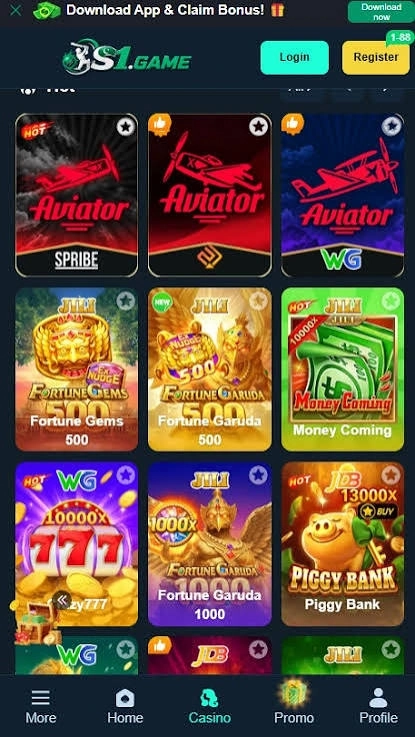
Different websites may use similar names, so users should not assume that every listing refers to the same application. Some pages may also describe features that cannot be confirmed. Checking reliable details before installation can help you avoid confusion and make a better decision. You can check this game for more income. 999YO Game
What Is S1 Game?
S1 Game is a name that may appear in searches for mobile gaming or entertainment services. Its exact purpose depends on the specific application or website being discussed. The name alone does not confirm the publisher, available functions, or reliability of a particular version.
Before using an app with this name, read its current description and check who is responsible for publishing it. Look for clear information about its purpose, system requirements, privacy practices, and user support.
It is also useful to compare the information shown on the app listing with the details provided on the publisher’s official website, if one can be verified. If the information is incomplete or inconsistent, do not assume that the missing details are correct.
Important Details to Check
Every mobile application should provide enough information for users to understand what they are installing. When researching S1 Game, consider these basic points before making a decision.
Publisher Information
The publisher is the person or organisation responsible for releasing an application. Check the developer’s name and available contact information.
Be careful if several unrelated websites use the same app name but provide different developer details. This may mean that the pages refer to different products or unofficial copies.
Purpose of the Application
Read the app description to understand its intended use. The description should explain the main function in clear words rather than relying on broad promises.
Do not assume that the app includes specific tools, game modes, bonuses, or other services unless reliable information confirms them.
Updated Information
App details can change over time. A description published a long time ago may not match the current version.
Check the date of the latest update when that information is available. Also review any notes about changes, compatibility, or known problems.
Exploring the Mobile Interface of S1 Game
The interface is the part of an app that appears on the phone screen. It includes menus, icons, buttons, text, and settings. A clear interface can help users understand an application without needing complicated instructions.
When reviewing S1 Game, pay attention to how the available screens are organised. Important options should have understandable labels, and the text should remain readable on a small display.
A confusing layout can make simple tasks difficult. For example, unclear buttons may leave users unsure about what will happen when they select an option.
However, a modern design does not automatically make an application trustworthy. A professional appearance should always be considered alongside the publisher’s details, privacy policy, and permission requests.
If an app displays unexpected messages or requests sensitive information without explaining why, stop and review the situation before continuing.
S1 Game and Android Device Support
Android phones come in different sizes and use different hardware and software versions. Because of these differences, one application may perform well on a device but have problems on another.
Before installing S1 Game, check the Android version supported by the specific listing. If no reliable requirements are available, it is not possible to confirm that the application will work on your phone.
Review Your Phone Settings
You can usually find your Android version by opening Settings and selecting About Phone or Software Information. The exact wording depends on the phone manufacturer.
Knowing your Android version helps you compare your device with an application’s stated requirements. Avoid installing unknown files just because a website claims they will work on every phone.
Check Available Memory and Storage
Your device needs enough free storage to install applications and manage temporary data. If the phone is almost full, some apps may run slowly or fail to update.
Review your storage settings before removing anything. Keep important photographs, documents, and other personal files backed up.
Keep Your Software Current
Android updates can include security improvements and fixes for known problems. When an update is available for your device, review the information and install it through the phone’s normal update settings.
App updates should also come from a trusted source. Do not install unfamiliar packages to solve a problem unless you can verify where they came from.
Download and Installation Information of S1 Game
Users may encounter different download pages while searching for S1 Game. These pages should not all be treated as equally reliable.
An application distributed through a trusted app store may provide useful details about the publisher, permissions, supported devices, and update history. A third-party download page may provide less information or offer a file that cannot be easily verified.
Before installing an app, confirm that the source is genuine. Read the available description and privacy information, and check whether the requested permissions make sense for its stated purpose.
If a website asks you to ignore security warnings or disable protective features without a clear reason, do not follow those instructions automatically.
It is also wise to avoid files that have unclear names or come from unrelated websites. A matching logo does not prove that a download is authentic.
Privacy and Data Protection of S1 Game
Privacy is an important part of using any digital service. An app may request information for account access, personalization, or other functions. Users should understand why their information is needed before providing it.
Read the privacy policy and look for details about data collection, storage, sharing, and deletion. If these details are missing or difficult to understand, consider whether you should use the service at all.
Never share your password or verification code with someone who contacts you online. A person claiming to provide technical help should not need your private login details.
Use a strong password that is not shared with your other important accounts. If you believe someone has accessed an account without permission, change the password through the official service and review the available security options.
Be careful when entering personal documents or financial information. Only provide sensitive details when the service is verified and there is a clear, legitimate reason.
Understanding App Permissions of S1 Game
Permissions control what an application can access on your phone. Depending on its purpose, an app may request access to notifications, the camera, location, contacts, or storage.
Before approving a request, consider whether it is needed for the feature you want to use. An application should have a reasonable explanation for asking to access sensitive information.
Android normally allows users to review permissions through Settings. Open the Apps section, select the relevant application, and look for its permissions options. The exact steps can vary by device.
If a request seems unrelated to the app’s purpose, deny it when possible. Do not grant every permission simply because the application asks for it.
Checking permissions regularly can also help you understand which applications have access to different parts of your phone.
Common Issues and Basic Checks of S1 Game
Sometimes mobile applications do not work as expected. The cause may be related to the internet connection, device settings, software compatibility, or the app itself.
The App Does Not Start
First, close the application and try opening it again. Check the phone’s available storage and restart the device if needed.
If the problem continues, review the app’s stated requirements and any available support information. Do not download a replacement file from an unknown website without checking its source.
Content Loads Slowly
A weak internet connection may delay online content. Check whether your connection is working properly and whether other trusted apps can access the internet.
If only one application has the problem, the issue may be related to that app or its service. Avoid changing important phone settings without understanding the possible effects.
Unexpected App Errors
Errors can occur because of outdated software, compatibility problems, or temporary service issues. Check for updates from a trusted source and read any available error message carefully.
Before clearing app data or reinstalling an application, remember that these actions may remove locally saved information or settings.
Responsible Use of Gaming Apps
Mobile entertainment can be enjoyable when it fits into a balanced daily routine. It should not replace sleep, education, work, exercise, or time with family and friends.
Set reasonable limits for screen time and take breaks when needed. If an application involves betting or real-money gaming, understand that financial losses are possible. No app should be treated as a guaranteed way to earn money.
Be cautious about promises of certain profits, easy rewards, or special offers that require an immediate payment. Advertising claims are not proof that a service will deliver the promised result.
Never send money because an online contact pressures you or guarantees a return. Check the applicable rules and the service’s terms before considering any financial activity.
If you cannot confirm what an application does or how it handles money and personal information, it is safer to pause rather than proceed without enough knowledge.
Benefits of Checking an App First
Spending a little time researching an application can help you make a more informed choice. This approach is useful when reviewing S1 Game or any other Android service.
Some practical benefits include:
- Understanding the application’s stated purpose.
- Checking whether your phone meets the requirements.
- Finding out who publishes the app.
- Reviewing privacy information before sharing details.
- Recognising unnecessary permission requests.
- Avoiding suspicious installation files.
- Identifying unsupported claims and misleading promises.
These checks cannot prove that an app is completely safe. However, they can help you notice warning signs before installing software or sharing private information.
Frequently Asked Questions of S1 Game
What is S1 Game?
S1 Game is a name that may appear in online searches for gaming-related applications or websites. Its exact features should be confirmed through the specific listing and publisher information.
Can I use S1 Game on any Android phone?
Compatibility depends on the actual application and your device. Check the supported Android version and other requirements before installation.
Should I trust every website offering S1 Game?
No. Different websites may provide different files or information. Verify the source and publisher before downloading an application.
Why is the privacy policy important?
A privacy policy explains how a service may collect, use, store, or share information. Reading it helps you understand what may happen to your data.
What should I do if the app stops working?
Check your internet connection, phone storage, software version, and available updates. If the issue remains, consult verified support information.
Are financial rewards guaranteed by gaming apps?
No claim of guaranteed earnings should be accepted without reliable evidence. Be careful with promises of certain returns, and avoid risking money based on online advertising.
Conclusion
S1 Game is a name that should be checked carefully before a user decides to install or use an application. Similar names can refer to different products, and online descriptions may not always provide accurate details.
Review the publisher, purpose, Android requirements, privacy policy, and permissions before proceeding. Use trusted sources, protect your personal information, and be cautious about claims that cannot be verified.
Download links
How to install S1 Game Download | Best Online Earning App For Android 2026 APK?
1. Tap the downloaded S1 Game Download | Best Online Earning App For Android 2026 APK file.
2. Touch install.
3. Follow the steps on the screen.